OpenAI launched Dots. Now Dot.com sends you to Grok. Awkward.
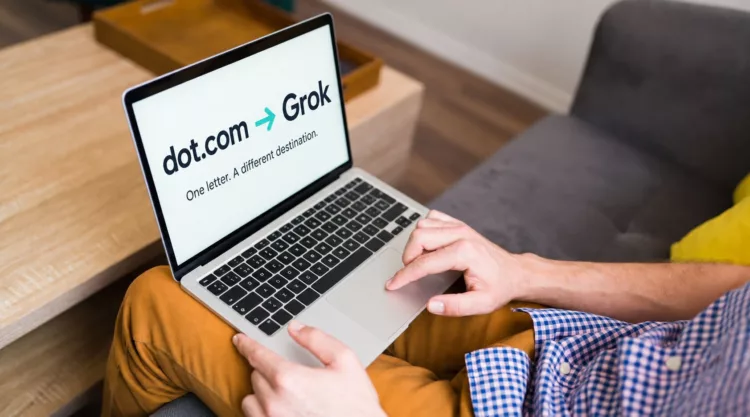
You announce a new AI product. People start talking. Someone types a very plausible web address into their browser… and lands on your competitor’s website. That is the awkward domain story surrounding OpenAI’s new Dots agents.
At the time of writing, dot.com redirects to the Grok Bot page, part of Elon Musk’s AI business. One missing “s”, a rival product, and plenty for the internet to get excited about.
Was it a carefully planned prank? That part is unconfirmed. But the mix-up makes a useful point for anyone launching a business: the name you announce and the address people remember need to work together.
First, let’s get our dots in a row
OpenAI, the company behind ChatGPT, introduced Dots on 29 September 2026. They are AI agents designed to keep working on tasks, use connected apps and retain context beyond a single conversation.
The domain attracting attention is dot.com, singular. Opening it takes visitors to Grok Bot, a competing AI product. Dots.com, plural, is a separate domain; reporting has linked it to a women’s fashion business.
That distinction matters. This is not evidence that Musk bought OpenAI’s website or took control of ChatGPT. It is a similar address sending visitors somewhere else.
According to Business Insider’s reporting, dot.com’s ownership records were updated on 28 July, before the public Dots announcement. The company had not publicly explained the acquisition when the report was published.
So, yes, there is a redirect. No, that does not establish that Musk bought the domain specifically to spoil OpenAI’s launch. The internet has supplied the motive; the available evidence leaves it open.
How one letter becomes a branding problem
Imagine hearing about a business called Bright Gardens on a podcast. Later, you try brightgarden.com. Was there an “s”? You cannot quite remember, and you are already typing.
That is the sort of everyday confusion this story illustrates. People hear names, skim posts and rely on memory. A name that looks obvious on a brand presentation can be much less obvious when someone tries to find it later.
If the address they choose belongs to somebody else, that business controls what greets them. It could be an unrelated shop, a parked page or a competitor with a conveniently relevant offer.
We do not have traffic figures showing how many potential Dots users reached Grok this way. It would be a stretch to call this a proven customer grab. What we can see is that a near-match domain became part of the launch conversation.
That alone is a good reason to check the neighbours before you choose your address.
What to check before announcing your name
You do not need a Silicon Valley budget to take a sensible approach. Start with the addresses your customers are most likely to try.
Test the name out loud. Tell someone your business name without showing them the spelling. Ask what they would type to find you. If their answer surprises you, you have found something worth investigating before the launch.
Look at the obvious variations. Check the singular and plural, common spelling mistakes and versions with or without a hyphen. Focus on plausible confusion. There is no need to collect every imaginable typo like Pokémon.
See what already lives there. An unavailable domain deserves a closer look. An established business with a similar name may create more confusion than an unused address. Consider that alongside your wider brand and name checks.
Choose an address you can use consistently. If your preferred .com is taken, a relevant country extension or another suitable extension may give you a clear alternative. Make the full address visible in your profiles, emails and marketing so people have less guesswork to do.
These checks are most useful while you still have options. Once the logo, packaging and launch campaign are finished, changing your mind becomes a much bigger job.
Give extra domains a job
If you register a sensible variation of your own brand’s domain, put it to use. A redirect can send visitors from that alternative address to your main website, helping people reach you even when their memory is slightly off.
Keep one clear primary address, track the domains you hold and stay on top of their renewals. A small, well-managed collection is easier to maintain than a long list nobody remembers buying.
Check the address before the big reveal
The dot.com story has all the ingredients of a good internet distraction: rival AI companies, a suspiciously convenient redirect and a single letter doing a lot of work.
For your business, the takeaway is practical. Before you get attached to a name, check the address, the likely variations and the businesses already using similar names.
You can start your domain search with EuroDNS, compare your options and choose an address that makes you easy to find.
Preferably before somebody else gets to deliver the punchline.
Articles liés: