Best Practices for Emailing Sensitive Data: 2026 Tips

Email is fast, familiar, and convenient: but it’s often not built to safely carry sensitive information. Whether you're sharing personal details, financial documents, or confidential business files, understanding how to secure your communications is essential.
Understanding the Risks of Emailing Sensitive Data
Standard email works like a digital postcard: it moves through multiple servers, is rarely encrypted by default, and can be intercepted or accessed if an account is compromised.
Common risks include:
- Unauthorized access from compromised inboxes
- Interception during transmission when emails aren’t encrypted
- Phishing attacks that trick users into exposing credentials
- Non-compliance with data-protection regulations
Understanding these vulnerabilities helps you decide when extra security measures are needed — and when email simply isn’t the right tool.
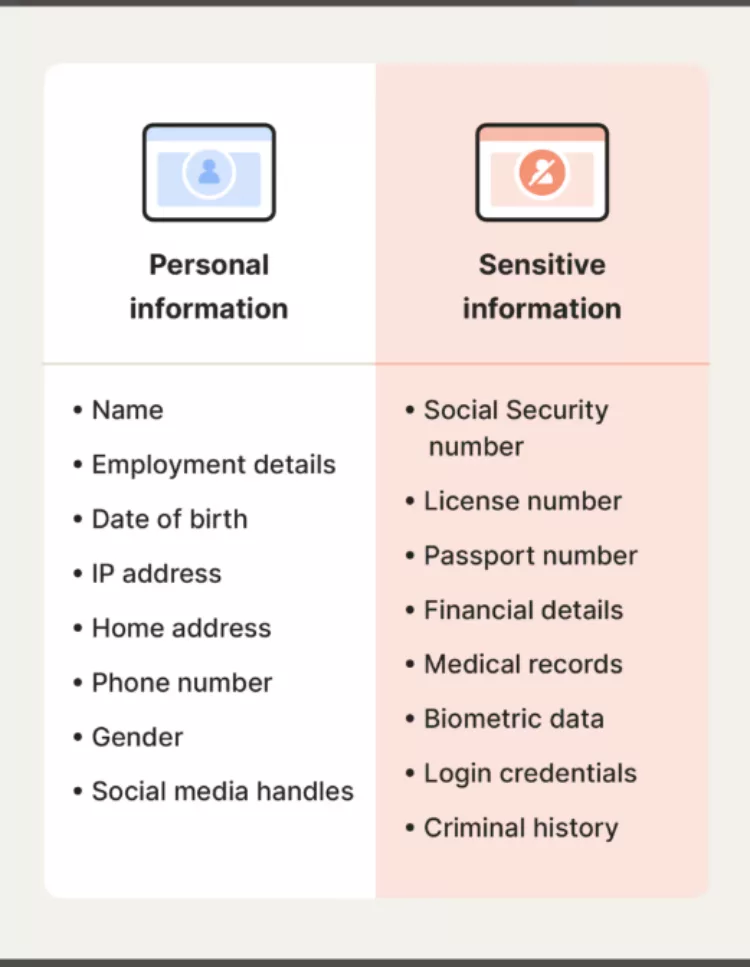
What Counts as Sensitive Data?
Sensitive data includes anything that could cause harm if exposed. This can be personal, financial, medical, or confidential business information.
- Personally identifiable information (PII)
- Financial details or credit card information
- Health or medical records
- Confidential business documents or strategic materials
Knowing what qualifies as sensitive helps you take the right protective steps before hitting “Send.”
Why Standard Email Isn’t Secure
Your regular inbox doesn’t automatically protect your message content. In most cases:
- Messages are not encrypted end-to-end
- Emails can be accessed by unintended recipients
- Content may be readable during transmission
These gaps make encryption and security features essential when sharing anything sensitive.
Core Principles for Secure Email Communication
To keep your emails secure, build your workflow around these core principles:
- Encrypt everything sensitive — including attachments
- Authenticate identities via MFA or secure platforms
- Use strong, unique passwords for email accounts
- Update software to patch vulnerabilities
- Train staff to recognize phishing and social engineering
- Limit content — only send what’s strictly necessary
With OX Email at EuroDNS, your inbox finally catches up with the rest of your business. You get a clean, professional address that matches your domain (no more @free-mail-provider vibes), plus calendars, contacts, tasks, and file storage all in one simple dashboard. Every new domain comes with a free branded mailbox you can activate in minutes, and when you are ready to level up, you can add real-time collaboration tools and extra security layers that keep phishing, spam, and data leaks in check.
Encryption: The Foundation of Secure Email
Email encryption scrambles your message so only the intended recipient can read it. Without encryption, emails are surprisingly exposed.
Common approaches include:
- Built-in email encryption (e.g., Outlook, Office 365)
- Third-party encryption tools for enhanced protection
- Updated encryption standards to maintain security
Always confirm whether your recipient’s email service supports your encryption method to avoid accessibility issues.
How to Encrypt Email in Outlook and Office 365
Outlook makes email encryption straightforward:
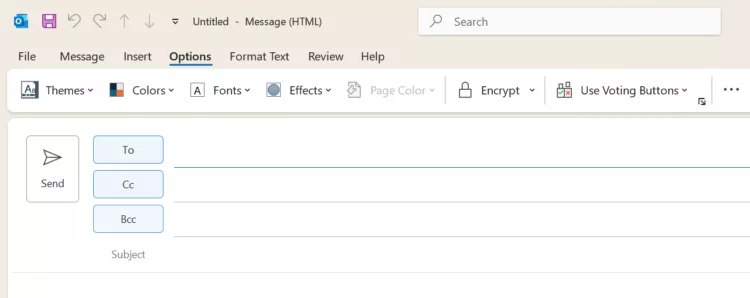
- Open a new email.
- Go to the Options tab.
- Select Encrypt.
- Choose an encryption level: Encrypt Only or Do Not Forward.
Business accounts may require admin-enabled encryption settings. If your recipient’s email provider doesn’t support encryption, Outlook will guide them through secure web access.
How to Encrypt Attachments and Password-Protect Files
Attachments often contain the most sensitive information — protect them separately:
- Attach the file to your email draft.
- Open the document, go to File → Info → Protect Document.
- Choose Encrypt with Password.
- Share the password through a separate secure channel (never the same email).
Step-by-Step: Sending Sensitive Information in Outlook
- Compose your email with only essential details.
- Enable encryption under the Options tab.
- Encrypt and password-protect any attachments.
- Double-check the recipient addresses.
- Send securely.
A minute of verification can prevent accidental data exposure.
Alternatives to Email for Sharing Confidential Documents
Sometimes email just isn’t secure enough. Consider alternatives like:
- Secure file-sharing services (Google Drive, Dropbox, OneDrive with restricted access)
- VPN-protected transfers
- Encrypted messaging platforms (Signal, WhatsApp Business)
Additional Outlook Security Features
Outlook offers more than encryption:
- Multi-Factor Authentication (MFA)
- Digital signatures to ensure message authenticity
- Security setting reviews and automatic updates
Lock down your inbox with Professional Email Security from EuroDNS. It adds an intelligent shield on top of your existing mailbox, filtering spam, blocking malware, and helping protect your team from phishing attacks before they ever land in the inbox. Integrated with the EuroDNS Email Cloud Suite, it’s a simple upgrade that gives you cleaner inboxes, fewer security scares, and more time to focus on actual work instead of chasing suspicious messages.
Common Mistakes to Avoid
- Sending sensitive data without encryption
- Using weak or shared passwords
- Sending passwords in the same email as attachments
- Failing to verify recipients before sending
Building a Culture of Security
Technology is half the solution — the other half is behavior. Build strong security habits by:
- Running regular cybersecurity training
- Establishing clear email and data-handling policies
- Encouraging quick reporting of suspicious activity
Conclusion
Protecting sensitive data transmitted via email is essential for your organization’s trust, compliance, and long-term security. By using encryption, adopting secure habits, and exploring safer alternatives when needed, you significantly reduce the risk of breaches and keep clients’ and colleagues’ data protected.
Domain Trends That Will Shape 2026
Related articles: